

AgentPress MD
Make Your WordPress Content AI-Ready with Optimized Markdown
AgentPress MD automatically generates clean, token-optimized Markdown versions of every page and post on your WordPress site — so AI bots like ChatGPT, Claude, Perplexity, and Google AI can read, understand, and recommend your content. AI-ready WordPress plugin!
90%
Fewer Tokens vs. HTML
30+
AI Bots Recognized
1-Click
Bulk MD Generation
100%
Automated — No Coding
Why Markdown Matters in the Age of AI
AI models like ChatGPT, Claude, Perplexity, and Google’s AI Overviews don’t browse the web like humans. They send bots — GPTBot, ClaudeBot, PerplexityBot — to crawl and ingest your content. But here’s the problem: your WordPress pages are bloated HTML.
A typical WordPress page contains navigation menus, sidebars, scripts, tracking pixels, schema markup, and dozens of nested <div> tags. AI models must parse through all this noise to find your actual content. This wastes tokens, reduces comprehension, and often leads AI to skip or misrepresent your content entirely.
HTML Is Noisy
A 1,000-word blog post can balloon to 15,000+ tokens when served as HTML. CSS classes, scripts, ads, and structural markup overwhelm the actual content that AI needs to understand.
Markdown Is Clean
That same post in Markdown? Around 1,500 tokens. Pure content with semantic structure — headings, lists, links — exactly what AI language models were trained on and understand best.
AI Prefers Markdown
LLMs are literally trained on Markdown. Every AI training dataset — Common Crawl, The Pile, Wikipedia dumps — converts content to Markdown first. It’s the native language AI models think in.
From WordPress to AI-Readable in 3 Steps
Install & Activate
Install the plugin from the WordPress plugin directory. Activate it, and AgentPress MD immediately begins generating clean Markdown versions of your content.
AI Bots Discover You
The plugin creates llms.txt, agents.json, and a Markdown sitemap. AI bots automatically discover and prefer these clean, structured endpoints over raw HTML pages.
You Get AI Traffic
When AI models understand your content better, they cite it more accurately and more often. Your site becomes a trusted source that AI recommends to millions of users.
How AgentPress MD Drives AI Traffic to Your WordPress Site
A new source of website traffic is emerging. When someone asks ChatGPT “What’s the best WordPress SEO plugin?” or asks Perplexity “How do I speed up my WordPress site?”, the AI provides an answer — and increasingly, it cites sources with links. If your content is what the AI ingested and understood, your site gets that referral.
This is AI referral traffic, and it’s growing exponentially. But AI can only recommend what it can understand. Here’s how AgentPress MD ensures your content is front-of-mind for every major AI model:
- llms.txt Discovery File — A standardized manifest that tells AI crawlers exactly what content is available and where to find it. Think of it as robots.txt, but for AI models.
- Markdown Sitemap — A dedicated sitemap listing all your .md endpoints so AI bots can efficiently crawl every page without parsing HTML.
- agents.json — Machine-readable metadata about your site optimized for AI agent discovery, following the emerging agents protocol standard.
- Token-Optimized Content — Each Markdown file includes structured frontmatter (title, date, author, categories) plus clean body content, maximizing information density per token.
- Alternate Link Headers — HTTP headers on every page pointing AI bots to the Markdown version, so they can always find the optimized format even when arriving via traditional crawling.
- Content Signals — Configurable AI permission signals (ai-train=yes, search=yes) that explicitly tell AI models they’re welcome to learn from and cite your content.
Choose the Right Plan for Your Site
The free version gets you started with core Markdown generation. Pro unlocks unlimited pages, advanced analytics, and full AI discoverability features.
Free
Perfect for small sites and getting started with AI optimization.
- Up to 50 Markdown pages
- Automatic MD generation on publish
- Frontmatter metadata (title, date, author)
- Pages & Posts post types
- URL formats: .md extension & query param
- Basic llms.txt file
- Internal link conversion to MD
- Gutenberg sidebar panel
Pro
$39 /year
Unlimited pages, full analytics, and advanced AI discoverability for serious sites.
- Everything in Free, plus:
- Unlimited Markdown pages
- AI Bot Analytics Dashboard
- Bot traffic tracking (30+ bots identified)
- Date range filtering (7d, 30d, 3m, 12m, custom)
- CSV export of all access logs
- Custom post type support (WooCommerce, CPTs)
- Bulk MD generation tool
- Custom frontmatter fields
- Priority support
AI Bot Analytics Dashboard
Know exactly which AI bots are accessing your content, how often, and which pages they prefer. The Pro analytics dashboard gives you unprecedented visibility into your AI traffic.
What You Can Track
The analytics dashboard automatically identifies and logs every AI bot that visits your Markdown files, sitemap, llms.txt, and agents.json endpoints. You’ll see:
- Total AI Requests — How many times AI bots have accessed your content
- Unique AI Bots — How many different AI crawlers are visiting (GPTBot, ClaudeBot, PerplexityBot, Googlebot, Bingbot, and 30+ more)
- Daily Averages & Trends — A visual bar chart showing request volume over time with daily, weekly, or monthly grouping
- Tokens Served — Total Markdown tokens delivered to AI bots
- Bot Breakdown Table — Each bot’s request count, last seen time, and token consumption
- Top Pages — Which of your pages AI bots access most frequently
- Full Access Log — Every individual request with timestamp, bot name, page, request type, and token count
Flexible Date Range Filtering
Switch between preset periods — 7 Days, 30 Days, 3 Months, 12 Months — or set a Custom date range (up to 1 year). All sections update instantly via AJAX. The chart automatically adjusts its grouping: daily bars for short ranges, weekly for medium, monthly for long ranges.
Export Everything
One-click CSV export downloads the complete access log filtered to your active date range. Perfect for reporting, analysis, or importing into your business intelligence tools.
Installation & Setup Guide
Step 1: Install the Plugin
From your WordPress admin dashboard, go to Plugins → Add New and search for “AgentPress MD”. Click Install Now, then Activate.
Alternatively, download the plugin ZIP file and upload it via Plugins → Add New → Upload Plugin.
Step 2: Generate Markdown for Existing Content
After activation, the plugin will automatically generate Markdown for new posts and pages as you publish them. But you likely have existing content that needs Markdown versions too.
Go to AgentPress MD → Tools tab and click “Bulk Generate All”. This will process every published page and post, creating optimized .md files for each one. A progress bar shows real-time status, and you can see exactly which posts are being processed in the log below.
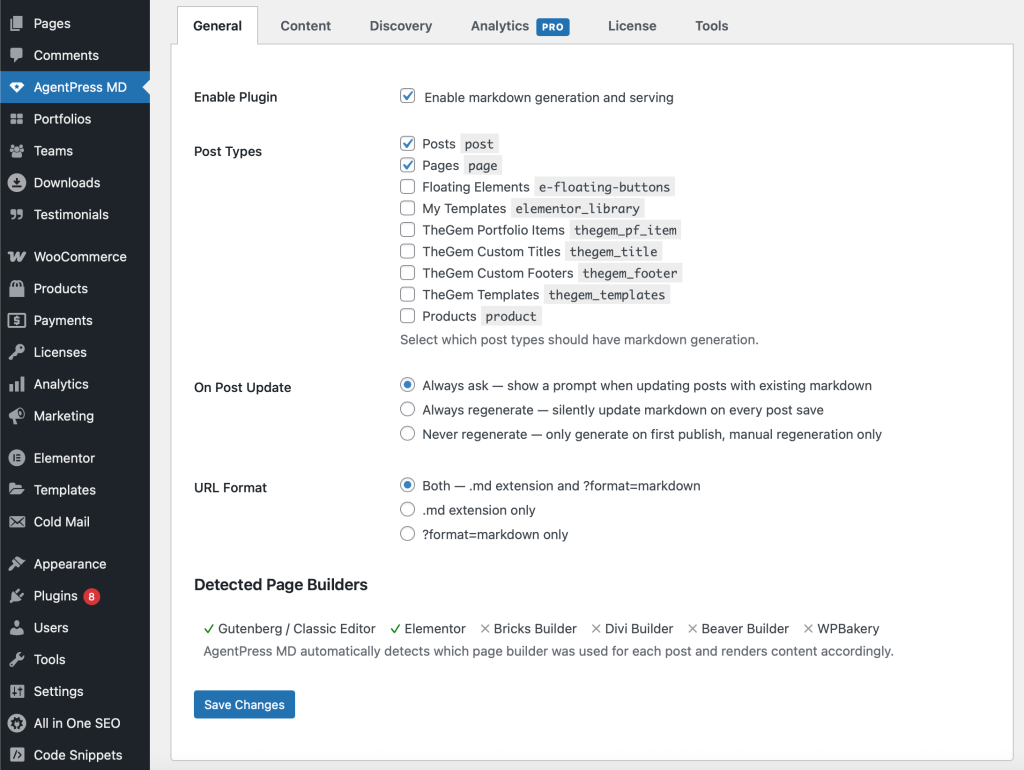
Step 3: Configure Post Types
By default, AgentPress MD generates Markdown for Pages and Posts. If your site uses custom post types (WooCommerce Products, Portfolio items, Testimonials, etc.), you’ll want to enable those too.
Go to AgentPress MD → General tab. Under “Post Types”, check every post type you want AI bots to access. After adding new post types, run the Bulk Generate tool again to create Markdown files for the newly included content.
Step 4: Configure Content Settings
Under the Content tab, you can fine-tune what gets included in your Markdown output:
- Include Featured Image — Adds the featured image URL and alt text to the Markdown frontmatter
- Include Taxonomies — Adds categories and tags as structured metadata
- Include Excerpt — Adds the post excerpt to frontmatter for AI summary context
- Convert Internal Links — Automatically converts internal links to point to .md versions, keeping AI bots within the Markdown ecosystem
- Custom Frontmatter — Add your own key-value pairs to every Markdown file’s YAML frontmatter
- Content Exclusions — Specify CSS selectors or shortcodes to strip from the Markdown output
Step 5: Configure Discovery Settings
Under the Discovery tab, enable the AI discovery endpoints:
- llms.txt — The standard AI discovery manifest file at
yoursite.com/llms.txt - agents.json — Machine-readable agent metadata at
yoursite.com/agents.json - Markdown Sitemap — A sitemap of all your .md endpoints for efficient AI crawling
- Alternate Link Headers — HTTP headers that point AI bots from HTML pages to their .md equivalents
- Content Signals — Permission signals like
ai-train=yesthat tell AI it’s welcome to use your content
Step 6: Activate Pro (Optional)
If you have a Pro license, go to AgentPress MD → License tab, enter your license key, and click Activate. This instantly unlocks unlimited pages, the analytics dashboard, custom post type support, and all Pro features. Your existing Markdown files are not affected — Pro simply removes the 50-page limit and adds advanced capabilities.
Frequently Asked Questions
Ready to Make Your Content AI-Ready?
Join thousands of WordPress sites already optimized for AI discovery. Install AgentPress MD today and start getting traffic from ChatGPT, Claude, Perplexity, and every major AI platform.