

Download MemberPress OTP Addon
MemberPress OTP Addon
The First & Only Complete OTP Verification Solution for MemberPress
Secure your WordPress membership site with powerful one-time password authentication for registration and login
🔐 Industry-First MemberPress OTP Integration
Revolutionize MemberPress Security with OTP Email Verification
The MemberPress OTP Addon is the pioneering WordPress plugin that brings enterprise-grade email verification and one-time password (OTP) authentication to your MemberPress membership site. As the first dedicated OTP solution for MemberPress, this plugin transforms how you secure user registrations and logins, preventing fake accounts, ensuring email validity, and dramatically enhancing membership site security.
Built specifically for WordPress and MemberPress, this two-factor authentication plugin seamlessly integrates OTP verification into your existing membership workflows without requiring any template modifications or complex configuration. Whether you’re running an online course platform, exclusive membership community, subscription service, or any MemberPress-powered site, our OTP addon delivers the security and verification your business demands.
Powerful Features for WordPress Membership Security
🔐
Global OTP Configuration
Configure OTP settings site-wide from a centralized dashboard. Enable or disable email verification for registration and login globally, with granular control over every aspect of the authentication process.
⚙️
Per-Membership Customization
Override global settings for individual membership levels. Enable strict verification for premium memberships while keeping basic tiers flexible, giving you complete control over your security strategy.
🚫
Domain Restriction Integration
Seamlessly integrates with MemberPress Restriction addon for advanced email domain filtering. Automatically enforces domain allowlists and blocklists, with intelligent fuzzy matching to suggest corrections.
⚡
Automatic Form Integration
Zero template editing required. Our plugin automatically injects OTP verification fields into MemberPress registration and login forms using WordPress hooks, ensuring compatibility and easy updates.
🛡️
Enterprise Security Standards
6-digit random OTP codes with 10-minute validity, one-time use enforcement, IP address logging, user agent tracking, and comprehensive rate limiting to prevent abuse and brute force attacks.
📊
Comprehensive Activity Logging
Track every OTP operation with detailed logs. Filter by email, action type, or status. Monitor failed attempts, identify patterns, and maintain complete audit trails for compliance and security analysis.
How MemberPress OTP Email Verification Works
Registration Flow with OTP Verification
1
User Submits Registration Form
New users fill out the MemberPress registration form with their email address and other required information. The OTP verification section appears automatically when enabled for that membership level.
2
Request Verification Code
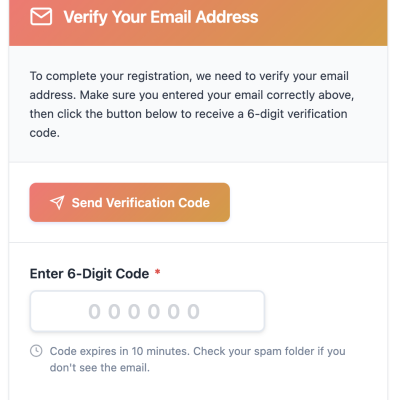
User clicks “Send Verification Code” button. The system validates the email format and checks domain restrictions (if configured), then generates a secure 6-digit OTP code.
3
OTP Email Delivery
The one-time password is sent to the user’s email address via WordPress mail system. The email includes the 6-digit code and validity information (expires in 10 minutes).
4
User Enters OTP Code
User retrieves the code from their email inbox and enters it into the verification field. The input field is optimized for numeric entry with automatic formatting and validation.
5
Verification & Registration Complete
Upon form submission, the system verifies the OTP matches and hasn’t expired. If valid, registration proceeds normally. Invalid or expired codes trigger clear error messages prompting the user to try again.
Login Flow with OTP Authentication
1
User Initiates Login
Existing members enter their username or email on the WordPress or MemberPress login form. When OTP login is enabled, an additional verification step is required.
2
Request Login Code
User clicks “Send Login Code” button. The system generates a unique OTP and sends it to the registered email address associated with the account.
3
Complete Authentication
User enters username, password, and the OTP code received via email. The system verifies all credentials together, providing an additional layer of security beyond traditional password-only authentication.
Complete Configuration Guide
Setting up OTP verification for your MemberPress site is straightforward and takes just minutes. Follow our comprehensive configuration guide to secure your membership platform.
1. Installation & Activation
- Upload the plugin: Upload the
memberpress-otp-addonfolder to/wp-content/plugins/directory - Activate: Go to WordPress admin → Plugins and activate “MemberPress OTP Addon”
- Requirements: Ensure you have WordPress 5.0+, PHP 7.2+, and an active MemberPress installation
- Verify activation: Check for the new “OTP Settings” submenu under MemberPress in your admin dashboard
2. Global Settings Configuration
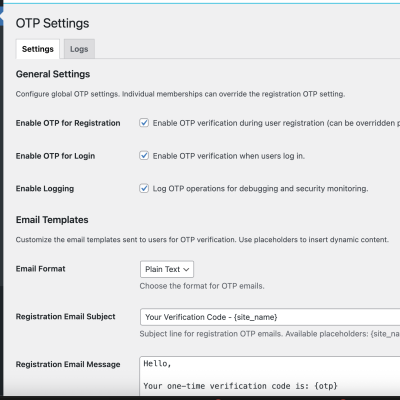
Location: WordPress Admin → MemberPress → OTP Settings
- Enable OTP for Registration: Check this box to require email verification during new user registration across all memberships (can be overridden per-membership)
- Enable OTP for Login: Check this box to require one-time password verification when users log in to your site
- Enable Logging: Activate comprehensive logging to track all OTP operations, useful for debugging, security monitoring, and compliance
- Save Settings: Click “Save Changes” to apply your global OTP configuration
💡 Pro Tip: Start with global settings enabled for registration only. Once comfortable, enable login OTP for additional security layers.
3. Per-Membership Configuration
Location: Edit any Membership → OTP Settings meta box
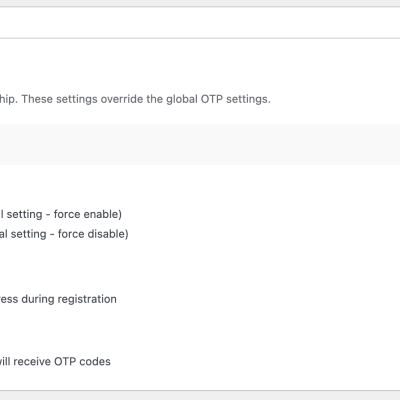
- Use Global Setting: Default option that follows your global OTP configuration. Best for most membership levels.
- Enable OTP for this Membership: Force-enable email verification for this specific membership, regardless of global settings. Perfect for premium or enterprise tiers requiring extra security.
- Disable OTP for this Membership: Force-disable OTP verification for this membership level, even if globally enabled. Useful for free trials or basic tiers where friction should be minimized.
- View Current Status: The meta box displays the current global setting status for quick reference
🎯 Strategy Tip: Enable strict OTP verification for paid/premium memberships while keeping free tiers using global settings for a balanced approach.
4. Domain Restriction Integration (Optional)
Requires: MemberPress Restriction Addon
- Automatic Detection: The OTP addon automatically detects and respects domain restrictions configured in MemberPress Restriction addon
- Allowlist Enforcement: When email domain allowlists are configured, OTP codes will only be sent to approved domains
- Smart Error Messages: Users with unauthorized domains receive clear error messages, including fuzzy-matched suggestions if they mistyped their domain
- No Extra Configuration: Domain restrictions work automatically once configured in the Restriction addon
5. Viewing & Managing OTP Logs
Location: MemberPress → OTP Settings → Logs Tab
- Filter by Email: Search logs for specific user email addresses to track their verification history
- Filter by Action: View only “send_otp” or “verify_otp” actions to analyze specific operations
- Filter by Status: Focus on “success”, “failed”, or “error” events to identify issues or patterns
- View Details: Each log entry includes timestamp, email, action, status, message, membership ID, IP address, and user agent
- Clear Logs: Use “Clear All Logs” button to remove old entries and maintain database performance
6. Advanced Customization (Developers)
The plugin provides WordPress hooks and filters for advanced customization:
Customize OTP Validity Period:
add_filter(‘mepr_otp_validity_period’, function($seconds) { return 300; // Change to 5 minutes instead of default 10 });
Customize Email Subject:
add_filter(‘mepr_otp_email_subject’, function($subject, $context) { if ($context === ‘registration’) { return ‘Your Registration Verification Code’; } return ‘Your Secure Login Code’; }, 10, 2);
Customize Email Message:
add_filter(‘mepr_otp_email_message’, function($message, $otp, $context) { return “Welcome! Your verification code is: {$otp}nnEnter this code to complete your registration.”; }, 10, 3);
Available Filters:
mepr_otp_validity_period– Modify OTP expiration time (default: 600 seconds)mepr_otp_email_subject– Customize OTP email subject linemepr_otp_email_message– Customize OTP email body contentmepr_otp_email_headers– Modify email headers for custom formatting
Why Your MemberPress Site Needs OTP Verification
Security Benefits
- Prevent Fake Accounts: Eliminate bot registrations and spam accounts by requiring verified email addresses
- Ensure Email Validity: Confirm users have access to the email addresses they provide during registration
- Two-Factor Authentication: Add an extra security layer beyond passwords for login protection
- Reduce Account Takeovers: Make it significantly harder for attackers to compromise member accounts
- Domain-Based Access Control: Restrict membership to specific email domains (corporate, educational, etc.)
- Compliance Ready: Meet security requirements for GDPR, SOC 2, and other regulatory frameworks
Business Benefits
- Higher Quality Members: Verified emails mean legitimate users who can receive important notifications and communications
- Improved Email Deliverability: Valid email lists reduce bounce rates and improve sender reputation
- Better User Experience: Modern, expected security feature that builds trust with your members
- Reduced Support Tickets: Fewer password reset requests and account access issues
- Flexible Configuration: Apply different security levels to different membership tiers based on your business model
- Zero Code Required: No template modifications or technical expertise needed for implementation
Real-World Use Cases for MemberPress OTP
🎓 Online Course Platforms & eLearning Sites
Ensure students use valid institutional or personal email addresses for course access. Prevent unauthorized sharing of course credentials and maintain accurate student records for certificate issuance.
💼 Corporate Training & Enterprise Memberships
Restrict access to employees with company email domains. Enable OTP verification for enterprise tiers while keeping public memberships less restrictive. Track access attempts and maintain security compliance.
📰 Premium Content & News Subscriptions
Verify subscriber email addresses to ensure they receive newsletters, updates, and premium content notifications. Reduce fake subscriptions that inflate metrics without providing value.
🏋️ Fitness & Wellness Communities
Authenticate members joining your online fitness community or wellness program. Enable email verification for paid memberships while offering flexible options for free trial users.
🔬 Research & Academic Communities
Limit membership to verified educational domains (.edu, .ac.uk, etc.). Ensure only qualified researchers and academics access your professional community or resource library.
💎 Exclusive VIP & Premium Member Clubs
Add prestigious security to high-value memberships. Demonstrate commitment to member privacy and security while preventing unauthorized access to exclusive content and benefits.
🛡️ SaaS & Software Access Portals
Verify customer email addresses for software licenses, support portals, and knowledge bases. Enable secure login with OTP for added protection of customer data and resources.
Technical Specifications & Architecture
| Feature | Specification |
|---|---|
| OTP Code Length | 6 digits (100,000 – 999,999) |
| Code Validity Period | 10 minutes (configurable via filter) |
| Code Usage | One-time use, automatically deleted after verification |
| Storage Method | WordPress transients (wp_options table) |
| Email Delivery | WordPress wp_mail() function (SMTP compatible) |
| Rate Limiting | Built-in WordPress transient expiration |
| Logging Storage | Custom database table (wp_mepr_otp_logs) |
| Integration Method | WordPress action/filter hooks (no template edits) |
| Frontend Technology | jQuery with AJAX for seamless UX |
| Security Tracking | IP address, user agent, timestamp logging |
System Requirements
- WordPress: Version 5.0 or higher
- PHP: Version 7.2 or higher (7.4+ recommended)
- MemberPress: Active installation (any version)
- MemberPress Restriction Addon: Optional, for domain restriction features
- Email Configuration: Working WordPress email delivery (SMTP recommended for reliability)
- Database: MySQL 5.6+ or MariaDB 10.1+
WordPress Membership Security Solution
The MemberPress OTP Addon is a comprehensive WordPress OTP plugin designed specifically for MemberPress email verification and membership site security. As the first dedicated one-time password plugin for MemberPress, it delivers enterprise-grade two-factor authentication for WordPress memberships without complexity.
Whether you need WordPress email verification, MemberPress security enhancement, membership registration OTP, or WordPress login OTP authentication, this plugin provides a complete solution. Built for WordPress membership plugins and optimized for MemberPress OTP verification, it seamlessly integrates with your existing WordPress membership site infrastructure.
Perfect for WordPress course platforms, subscription sites, online communities, and any WordPress membership website requiring email verification for WordPress registration and enhanced WordPress login security. The plugin supports WordPress domain restrictions, membership access control, and WordPress security logging for complete visibility and control.
Secure Your MemberPress Site Today
Join the growing number of WordPress membership sites using OTP verification to protect their members and enhance security. Install the MemberPress OTP Addon and transform your membership platform with enterprise-grade email verification.
Support & Documentation
📚 Documentation
Complete documentation is included in the plugin’s README.md file, covering installation, configuration, customization, and troubleshooting.
🐛 Troubleshooting Common Issues
- OTP emails not arriving: Check WordPress email configuration, test with SMTP plugin like WP Mail SMTP, verify spam folders
- Settings not saving: Ensure JavaScript is enabled, check for plugin conflicts, verify file permissions
- OTP tab not appearing: Confirm MemberPress is active, clear WordPress cache, check for theme conflicts
- Domain restrictions not working: Verify MemberPress Restriction addon is installed and configured properly
🔧 Developer Resources
Developers can extend the plugin using WordPress hooks and filters. All available hooks are documented in the README.md file with code examples for common customization scenarios.
License: GPL2 | Version: 1.0.2 | Author: TechCreative | Compatible with: WordPress 5.0+, MemberPress (all versions)